


| Plan | vCPU | RAM | Storage | Network speed | Backup | Operating system | Price | Order |
|---|---|---|---|---|---|---|---|---|
| CentOS 01 | vCPU 1 vCPU Intel Platinum 8272CL | RAM 1 GB RAM DDR4 ECC | Storage 20 GB SSD NVMe Enterprise | Network speed 10 Gbps | Backup 2 times/week | Operating system | 82,500 VND /month | |
| CentOS 02 | vCPU 1 vCPU Intel Platinum 8272CL | RAM 2 GB RAM DDR4 ECC | Storage 25 GB SSD NVMe Enterprise | Network speed 10 Gbps | Backup 2 times/week | Operating system | 110,000 VND /month | |
| CentOS 03 | vCPU 2 vCPU Intel Platinum 8272CL | RAM 2 GB RAM DDR4 ECC | Storage 25 GB SSD NVMe Enterprise | Network speed 10 Gbps | Backup 2 times/week | Operating system | 154,000 VND /month | |
| CentOS 04 | vCPU 2 vCPU Intel Platinum 8272CL | RAM 4 GB RAM DDR4 ECC | Storage 30 GB SSD NVMe Enterprise | Network speed 10 Gbps | Backup 2 times/week | Operating system | 198,000 VND /month | |
| CentOS 05 | vCPU 3 vCPU Intel Platinum 8272CL | RAM 3 GB RAM DDR4 ECC | Storage 30 GB SSD NVMe Enterprise | Network speed 10 Gbps | Backup 2 times/week | Operating system | 231,000 VND /month | |
| CentOS 06 | vCPU 3 vCPU Intel Platinum 8272CL | RAM 6 GB RAM DDR4 ECC | Storage 30 GB SSD NVMe Enterprise | Network speed 10 Gbps | Backup 2 times/week | Operating system | 297,000 VND /month | |
| CentOS 07 | vCPU 4 vCPU Intel Platinum 8272CL | RAM 4 GB RAM DDR4 ECC | Storage 40 GB SSD NVMe Enterprise | Network speed 10 Gbps | Backup 2 times/week | Operating system | 308,000 VND /month | |
| CentOS 08 | vCPU 4 vCPU Intel Platinum 8272CL | RAM 6 GB RAM DDR4 ECC | Storage 40 GB SSD NVMe Enterprise | Network speed 10 Gbps | Backup 2 times/week | Operating system | 352,000 VND /month | |
| CentOS 09 | vCPU 4 vCPU Intel Platinum 8272CL | RAM 8 GB RAM DDR4 ECC | Storage 40 GB SSD NVMe Enterprise | Network speed 10 Gbps | Backup 2 times/week | Operating system | 396.000 VND /month | |
| CentOS 10 | vCPU 6 vCPU Intel Platinum 8272CL | RAM 8 GB RAM DDR4 ECC | Storage 40 GB SSD NVMe Enterprise | Network speed 10 Gbps | Backup 2 times/week | Operating system | 506.000 VND /month | |
| CentOS 11 | vCPU 6 vCPU Intel Platinum 8272CL | RAM 12 GB RAM DDR4 ECC | Storage 50 GB SSD NVMe Enterprise | Network speed 10 Gbps | Backup 2 times/week | Operating system | 594.000 VND /month | |
| CentOS 12 | vCPU 8 vCPU Intel Platinum 8272CL | RAM 12 GB RAM DDR4 ECC | Storage 50 GB SSD NVMe Enterprise | Network speed 10 Gbps | Backup 2 times/week | Operating system | 704.000 VND /month | |
| CentOS 13 | vCPU 8 vCPU Intel Platinum 8272CL | RAM 16 GB RAM DDR4 ECC | Storage 60 GB SSD NVMe Enterprise | Network speed 10 Gbps | Backup 2 times/week | Operating system | 792,000 VND /month | |
| CentOS 14 | vCPU 8 vCPU Intel Platinum 8272CL | RAM 24 GB RAM DDR4 ECC | Storage 70 GB SSD NVMe Enterprise | Network speed 10 Gbps | Backup 2 times/week | Operating system | 968,000 VND /month | |
| CentOS 15 | vCPU 10 vCPU Intel Platinum 8272CL | RAM 20 GB RAM DDR4 ECC | Storage 70 GB SSD NVMe Enterprise | Network speed 10 Gbps | Backup 2 times/week | Operating system | 990,000 VND /month | |
| CentOS 16 | vCPU 12 vCPU Intel Platinum 8272CL | RAM 18 GB RAM DDR4 ECC | Storage 80 GB SSD NVMe Enterprise | Network speed 10 Gbps | Backup 2 times/week | Operating system | 1,056,000 VND /month | |
| CentOS 17 | vCPU 16 vCPU Intel Platinum 8272CL | RAM 24 GB RAM DDR4 ECC | Storage 100 GB SSD NVMe Enterprise | Network speed 10 Gbps | Backup 2 times/week | Operating system | 1,408,000 VND /month | |
| CentOS 18 | vCPU 16 vCPU Intel Platinum 8272CL | RAM 32 GB RAM DDR4 ECC | Storage 100 GB SSD NVMe Enterprise | Network speed 10 Gbps | Backup 2 times/week | Operating system | 1,584,000 VND /month | |
| CentOS 19 | vCPU 20 vCPU Intel Platinum 8272CL | RAM 40 GB RAM DDR4 ECC | Storage 120 GB SSD NVMe Enterprise | Network speed 10 Gbps | Backup 2 times/week | Operating system | 1,980,000 VND /month | |
| CentOS 20 | vCPU 24 vCPU Intel Platinum 8272CL | RAM 64 GB RAM DDR4 ECC | Storage 150 GB SSD NVMe Enterprise | Network speed 10 Gbps | Backup 2 times/week | Operating system | 2,728,000 VND /month | |
| CentOS 21 | vCPU 32 vCPU Intel Platinum 8272CL | RAM 96 GB RAM DDR4 ECC | Storage 180 GB SSD NVMe Enterprise | Network speed 10 Gbps | Backup 2 times/week | Operating system | 3,872,000 VND /month | |
| CentOS 22 | vCPU 48 vCPU Intel Platinum 8272CL | RAM 128 GB RAM DDR4 ECC | Storage 200 GB SSD NVMe Enterprise | Network speed 10 Gbps | Backup 2 times/week | Operating system | 5.456.000 VND /month | |
| CentOS 23 | vCPU 64 vCPU Intel Platinum 8272CL | RAM 160 GB RAM DDR4 ECC | Storage 250 GB SSD NVMe Enterprise | Network speed 10 Gbps | Backup 2 times/week | Operating system | 7.040.000 VND /month | |
| CentOS 24 | vCPU 96 vCPU Intel Platinum 8272CL | RAM 256 GB RAM DDR4 ECC | Storage 300 GB SSD NVMe Enterprise | Network speed 10 Gbps | Backup 2 times/week | Operating system | 10,912,000 VND /month |
VPS CentOS
CentOS VPS at VPTS offers a familiar Linux environment with the RHEL ecosystem and extensive legacy enterprise software support; suitable for websites, control panels, internal applications, and systems maintaining a CentOS stack.
- Pre-installed CentOS 6.10, 7.9, 8.2, 9, and 10 upon VPS ordering
- Select all four lines: Intel Platinum, AMD EPYC, Ryzen 9, and Intel Gold
- Enterprise NVMe, 10Gbps network, scheduled backups, and 24/7 technical support
7-day money-back guarantee if not satisfied
CentOS VPS Pricing
Select the hardware tab to view full configurations from plan 01 to the last plan. Plan names are standardized by VPS CentOS and the operating system selector comes pre-selected with CentOS.
| Plan | vCPU | RAM | Storage | Network speed | Backup | Operating system | Price | Order |
|---|---|---|---|---|---|---|---|---|
| CentOS 01 | vCPU 1 vCPU AMD EPYC 7J13 | RAM 1 GB RAM DDR4 ECC | Storage 20 GB SSD NVMe Enterprise | Network speed 10 Gbps | Backup 2 times/week | Operating system | 82,500 VND /month | |
| CentOS 02 | vCPU 1 vCPU AMD EPYC 7J13 | RAM 2 GB RAM DDR4 ECC | Storage 25 GB SSD NVMe Enterprise | Network speed 10 Gbps | Backup 2 times/week | Operating system | 110,000 VND /month | |
| CentOS 03 | vCPU 2 vCPU AMD EPYC 7J13 | RAM 2 GB RAM DDR4 ECC | Storage 25 GB SSD NVMe Enterprise | Network speed 10 Gbps | Backup 2 times/week | Operating system | 154,000 VND /month | |
| CentOS 04 | vCPU 2 vCPU AMD EPYC 7J13 | RAM 4 GB RAM DDR4 ECC | Storage 30 GB SSD NVMe Enterprise | Network speed 10 Gbps | Backup 2 times/week | Operating system | 198,000 VND /month | |
| CentOS 05 | vCPU 3 vCPU AMD EPYC 7J13 | RAM 3 GB RAM DDR4 ECC | Storage 30 GB SSD NVMe Enterprise | Network speed 10 Gbps | Backup 2 times/week | Operating system | 231,000 VND /month | |
| CentOS 06 | vCPU 3 vCPU AMD EPYC 7J13 | RAM 6 GB RAM DDR4 ECC | Storage 30 GB SSD NVMe Enterprise | Network speed 10 Gbps | Backup 2 times/week | Operating system | 297,000 VND /month | |
| CentOS 07 | vCPU 4 vCPU AMD EPYC 7J13 | RAM 4 GB RAM DDR4 ECC | Storage 40 GB SSD NVMe Enterprise | Network speed 10 Gbps | Backup 2 times/week | Operating system | 308,000 VND /month | |
| CentOS 08 | vCPU 4 vCPU AMD EPYC 7J13 | RAM 6 GB RAM DDR4 ECC | Storage 40 GB SSD NVMe Enterprise | Network speed 10 Gbps | Backup 2 times/week | Operating system | 352,000 VND /month | |
| CentOS 09 | vCPU 4 vCPU AMD EPYC 7J13 | RAM 8 GB RAM DDR4 ECC | Storage 40 GB SSD NVMe Enterprise | Network speed 10 Gbps | Backup 2 times/week | Operating system | 396.000 VND /month | |
| CentOS 10 | vCPU 6 vCPU AMD EPYC 7J13 | RAM 8 GB RAM DDR4 ECC | Storage 40 GB SSD NVMe Enterprise | Network speed 10 Gbps | Backup 2 times/week | Operating system | 506.000 VND /month | |
| CentOS 11 | vCPU 6 vCPU AMD EPYC 7J13 | RAM 12 GB RAM DDR4 ECC | Storage 50 GB SSD NVMe Enterprise | Network speed 10 Gbps | Backup 2 times/week | Operating system | 594.000 VND /month | |
| CentOS 12 | vCPU 8 vCPU AMD EPYC 7J13 | RAM 12 GB RAM DDR4 ECC | Storage 50 GB SSD NVMe Enterprise | Network speed 10 Gbps | Backup 2 times/week | Operating system | 704.000 VND /month | |
| CentOS 13 | vCPU 8 vCPU AMD EPYC 7J13 | RAM 16 GB RAM DDR4 ECC | Storage 60 GB SSD NVMe Enterprise | Network speed 10 Gbps | Backup 2 times/week | Operating system | 792,000 VND /month | |
| CentOS 14 | vCPU 8 vCPU AMD EPYC 7J13 | RAM 24 GB RAM DDR4 ECC | Storage 70 GB SSD NVMe Enterprise | Network speed 10 Gbps | Backup 2 times/week | Operating system | 968,000 VND /month | |
| CentOS 15 | vCPU 10 vCPU AMD EPYC 7J13 | RAM 20 GB RAM DDR4 ECC | Storage 70 GB SSD NVMe Enterprise | Network speed 10 Gbps | Backup 2 times/week | Operating system | 990,000 VND /month | |
| CentOS 16 | vCPU 12 vCPU AMD EPYC 7J13 | RAM 18 GB RAM DDR4 ECC | Storage 80 GB SSD NVMe Enterprise | Network speed 10 Gbps | Backup 2 times/week | Operating system | 1,056,000 VND /month | |
| CentOS 17 | vCPU 16 vCPU AMD EPYC 7J13 | RAM 24 GB RAM DDR4 ECC | Storage 100 GB SSD NVMe Enterprise | Network speed 10 Gbps | Backup 2 times/week | Operating system | 1,408,000 VND /month | |
| CentOS 18 | vCPU 16 vCPU AMD EPYC 7J13 | RAM 32 GB RAM DDR4 ECC | Storage 100 GB SSD NVMe Enterprise | Network speed 10 Gbps | Backup 2 times/week | Operating system | 1,584,000 VND /month | |
| CentOS 19 | vCPU 20 vCPU AMD EPYC 7J13 | RAM 40 GB RAM DDR4 ECC | Storage 120 GB SSD NVMe Enterprise | Network speed 10 Gbps | Backup 2 times/week | Operating system | 1,980,000 VND /month | |
| CentOS 20 | vCPU 24 vCPU AMD EPYC 7J13 | RAM 64 GB RAM DDR4 ECC | Storage 150 GB SSD NVMe Enterprise | Network speed 10 Gbps | Backup 2 times/week | Operating system | 2,728,000 VND /month | |
| CentOS 21 | vCPU 32 vCPU AMD EPYC 7J13 | RAM 96 GB RAM DDR4 ECC | Storage 180 GB SSD NVMe Enterprise | Network speed 10 Gbps | Backup 2 times/week | Operating system | 3,872,000 VND /month | |
| CentOS 22 | vCPU 48 vCPU AMD EPYC 7J13 | RAM 128 GB RAM DDR4 ECC | Storage 200 GB SSD NVMe Enterprise | Network speed 10 Gbps | Backup 2 times/week | Operating system | 5.456.000 VND /month | |
| CentOS 23 | vCPU 64 vCPU AMD EPYC 7J13 | RAM 160 GB RAM DDR4 ECC | Storage 250 GB SSD NVMe Enterprise | Network speed 10 Gbps | Backup 2 times/week | Operating system | 7.040.000 VND /month | |
| CentOS 24 | vCPU 96 vCPU AMD EPYC 7J13 | RAM 256 GB RAM DDR4 ECC | Storage 300 GB SSD NVMe Enterprise | Network speed 10 Gbps | Backup 2 times/week | Operating system | 10,912,000 VND /month |
| Plan | vCPU | RAM | Storage | Network speed | Backup | Operating system | Price | Order |
|---|---|---|---|---|---|---|---|---|
| CentOS 01 | vCPU 2 vCPU AMD Ryzen 9 9950X | RAM 4 GB RAM DDR5 5600 MHz | Storage 40 GB SSD NVMe Enterprise | Network speed 10 Gbps | Backup 2 times/week | Operating system | 416.000 VND /month | |
| CentOS 02 | vCPU 3 vCPU AMD Ryzen 9 9950X | RAM 6 GB RAM DDR5 5600 MHz | Storage 50 GB SSD NVMe Enterprise | Network speed 10 Gbps | Backup 2 times/week | Operating system | 624.000 VND /month | |
| CentOS 03 | vCPU 4 vCPU AMD Ryzen 9 9950X | RAM 8 GB RAM DDR5 5600 MHz | Storage 60 GB SSD NVMe Enterprise | Network speed 10 Gbps | Backup 2 times/week | Operating system | 832,000 VND /month | |
| CentOS 04 | vCPU 6 vCPU AMD Ryzen 9 9950X | RAM 12 GB RAM DDR5 5600 MHz | Storage 70 GB SSD NVMe Enterprise | Network speed 10 Gbps | Backup 2 times/week | Operating system | 1,248,000 VND /month | |
| CentOS 05 | vCPU 8 vCPU AMD Ryzen 9 9950X | RAM 16 GB RAM DDR5 5600 MHz | Storage 80 GB SSD NVMe Enterprise | Network speed 10 Gbps | Backup 2 times/week | Operating system | 1,664,000 VND /month | |
| CentOS 06 | vCPU 10 vCPU AMD Ryzen 9 9950X | RAM 24 GB RAM DDR5 5600 MHz | Storage 90 GB SSD NVMe Enterprise | Network speed 10 Gbps | Backup 2 times/week | Operating system | 2,296,000 VND /month | |
| CentOS 07 | vCPU 12 vCPU AMD Ryzen 9 9950X | RAM 28 GB RAM DDR5 5600 MHz | Storage 100 GB SSD NVMe Enterprise | Network speed 10 Gbps | Backup 2 times/week | Operating system | 2,712,000 VND /month | |
| CentOS 08 | vCPU 14 vCPU AMD Ryzen 9 9950X | RAM 32 GB RAM DDR5 5600 MHz | Storage 120 GB SSD NVMe Enterprise | Network speed 10 Gbps | Backup 2 times/week | Operating system | 3,128,000 VND /month | |
| CentOS 09 | vCPU 16 vCPU AMD Ryzen 9 9950X | RAM 36 GB RAM DDR5 5600 MHz | Storage 140 GB SSD NVMe Enterprise | Network speed 10 Gbps | Backup 2 times/week | Operating system | 3,544,000 VND /month | |
| CentOS 10 | vCPU 18 vCPU AMD Ryzen 9 9950X | RAM 48 GB RAM DDR5 5600 MHz | Storage 160 GB SSD NVMe Enterprise | Network speed 10 Gbps | Backup 2 times/week | Operating system | 4.392.000 VND /month | |
| CentOS 11 | vCPU 20 vCPU AMD Ryzen 9 9950X | RAM 56 GB RAM DDR5 5600 MHz | Storage 180 GB SSD NVMe Enterprise | Network speed 10 Gbps | Backup 2 times/week | Operating system | 5.024.000 VND /month | |
| CentOS 12 | vCPU 22 vCPU AMD Ryzen 9 9950X | RAM 72 GB RAM DDR5 5600 MHz | Storage 200 GB SSD NVMe Enterprise | Network speed 10 Gbps | Backup 2 times/week | Operating system | 6.088.000 VND /month | |
| CentOS 13 | vCPU 24 vCPU AMD Ryzen 9 9950X | RAM 80 GB RAM DDR5 5600 MHz | Storage 220 GB SSD NVMe Enterprise | Network speed 10 Gbps | Backup 2 times/week | Operating system | 6.720.000 VND /month | |
| CentOS 14 | vCPU 28 vCPU AMD Ryzen 9 9950X | RAM 96 GB RAM DDR5 5600 MHz | Storage 240 GB SSD NVMe Enterprise | Network speed 10 Gbps | Backup 2 times/week | Operating system | 7.984.000 VND /month | |
| CentOS 15 | vCPU 32 vCPU AMD Ryzen 9 9950X | RAM 128 GB RAM DDR5 5600 MHz | Storage 300 GB SSD NVMe Enterprise | Network speed 10 Gbps | Backup 2 times/week | Operating system | 10,112,000 VND /month |
| Plan | vCPU | RAM | Storage | Network speed | Backup | Operating system | Price | Order |
|---|---|---|---|---|---|---|---|---|
| CentOS 01 | vCPU 2 vCPU Intel Gold 6144 | RAM 4 GB RAM DDR4 ECC | Storage 50 GB SSD NVMe Enterprise | Network speed 10 Gbps | Backup 2 times/week | Operating system | 228,000 VND /month | |
| CentOS 02 | vCPU 3 vCPU Intel Gold 6144 | RAM 6 GB RAM DDR4 ECC | Storage 60 GB SSD NVMe Enterprise | Network speed 10 Gbps | Backup 2 times/week | Operating system | 342,000 VND /month | |
| CentOS 03 | vCPU 4 vCPU Intel Gold 6144 | RAM 8 GB RAM DDR4 ECC | Storage 70 GB SSD NVMe Enterprise | Network speed 10 Gbps | Backup 2 times/week | Operating system | 456.000 VND /month | |
| CentOS 04 | vCPU 6 vCPU Intel Gold 6144 | RAM 12 GB RAM DDR4 ECC | Storage 80 GB SSD NVMe Enterprise | Network speed 10 Gbps | Backup 2 times/week | Operating system | 684.000 VND /month | |
| CentOS 05 | vCPU 8 vCPU Intel Gold 6144 | RAM 16 GB RAM DDR4 ECC | Storage 90 GB SSD NVMe Enterprise | Network speed 10 Gbps | Backup 2 times/week | Operating system | 912,000 VND /month | |
| CentOS 06 | vCPU 10 vCPU Intel Gold 6144 | RAM 24 GB RAM DDR4 ECC | Storage 100 GB SSD NVMe Enterprise | Network speed 10 Gbps | Backup 2 times/week | Operating system | 1,228,000 VND /month | |
| CentOS 07 | vCPU 12 vCPU Intel Gold 6144 | RAM 28 GB RAM DDR4 ECC | Storage 120 GB SSD NVMe Enterprise | Network speed 10 Gbps | Backup 2 times/week | Operating system | 1,456,000 VND /month | |
| CentOS 08 | vCPU 14 vCPU Intel Gold 6144 | RAM 32 GB RAM DDR4 ECC | Storage 140 GB SSD NVMe Enterprise | Network speed 10 Gbps | Backup 2 times/week | Operating system | 1,684,000 VND /month | |
| CentOS 09 | vCPU 16 vCPU Intel Gold 6144 | RAM 36 GB RAM DDR4 ECC | Storage 160 GB SSD NVMe Enterprise | Network speed 10 Gbps | Backup 2 times/week | Operating system | 1,912,000 VND /month | |
| CentOS 10 | vCPU 18 vCPU Intel Gold 6144 | RAM 48 GB RAM DDR4 ECC | Storage 200 GB SSD NVMe Enterprise | Network speed 10 Gbps | Backup 2 times/week | Operating system | 2,316,000 VND /month | |
| CentOS 11 | vCPU 20 vCPU Intel Gold 6144 | RAM 56 GB RAM DDR4 ECC | Storage 250 GB SSD NVMe Enterprise | Network speed 10 Gbps | Backup 2 times/week | Operating system | 2,632,000 VND /month | |
| CentOS 12 | vCPU 22 vCPU Intel Gold 6144 | RAM 72 GB RAM DDR4 ECC | Storage 300 GB SSD NVMe Enterprise | Network speed 10 Gbps | Backup 2 times/week | Operating system | 3,124,000 VND /month | |
| CentOS 13 | vCPU 24 vCPU Intel Gold 6144 | RAM 80 GB RAM DDR4 ECC | Storage 350 GB SSD NVMe Enterprise | Network speed 10 Gbps | Backup 2 times/week | Operating system | 3,440,000 VND /month | |
| CentOS 14 | vCPU 28 vCPU Intel Gold 6144 | RAM 96 GB RAM DDR4 ECC | Storage 400 GB SSD NVMe Enterprise | Network speed 10 Gbps | Backup 2 times/week | Operating system | 4.072.000 VND /month | |
| CentOS 15 | vCPU 32 vCPU Intel Gold 6144 | RAM 128 GB RAM DDR4 ECC | Storage 500 GB SSD NVMe Enterprise | Network speed 10 Gbps | Backup 2 times/week | Operating system | 5.056.000 VND /month |

Add 1 vCPU
55.000 VND

Add 1 GB DDR4 ECC RAM
22,000 VND

Add 10 GB NVMe SSD
12,000 VND

Add 1 IPv4
25,000 VND
Highlights of CentOS VPS

Exact CentOS version
Logos and installation images dedicated to CentOS 6.10, 7.9, 8.2, 9, and 10; OS selector is pre-enabled but still allows changing before ordering.
Mua ngay
Familiar RPM, YUM, and DNF
Suitable for teams with existing playbooks, repositories, and administration workflows in the CentOS/RHEL ecosystem.
Mua ngay
Maintain legacy software compatibility
Useful for control panels, libraries, or internal applications tested on a specific CentOS version that cannot be migrated immediately.
Mua ngay
For existing CentOS stacks
CentOS is best suited when legacy software or workflows require this environment; new projects should also consider AlmaLinux or Rocky Linux.
Mua ngayWhat is CentOS VPS?
CentOS VPS is a virtual server configured for rapid deployment of CentOS 6.10, 7.9, 8.2, 9, and 10. Customers receive dedicated CPU, RAM, disk space, and IP addresses, along with full root access to set up websites, applications, or services as needed.
CentOS's strength is a familiar Linux environment with the RHEL ecosystem and extensive legacy enterprise software support. Therefore, the service is suitable for websites, control panels, internal applications, and systems maintaining a CentOS stack.
At VPTS, customers can choose between four hardware lines instead of being limited to a single configuration: balanced Intel Platinum, multi-core AMD EPYC, high-clock Ryzen 9, and Intel Gold for low-latency tasks.
Administrative control allows customers to maintain compatibility with RPM/DNF/YUM administrative workflows and traditional server configurations. Resources can be upgraded based on actual traffic, data, and process counts to avoid overprovisioning from the start.
- Supports CentOS 6.10, 7.9, 8.2, 9, and 10.
- Full root or Administrator rights depending on the operating system.
- Enterprise NVMe, 10Gbps network, and dedicated IPv4/IPv6.
- Can scale CPU, RAM, and storage as your system grows.
VPTS aims to deliver the best experience for customers when using our services. For detailed information, please contact viaFanpageor viaZaloOA.
What Is CentOS VPS Used For?
CentOS VPS is suitable for LAMP/LEMP stacks, internal services, hosting panels, and applications requiring a CentOS-compatible environment. The use cases below focus specifically on CentOS's ecosystem, administration tools, and operational limits, rather than a generic list for all operating systems.

Websites and panels currently using CentOS
Maintain LAMP/LEMP stacks, control panels, or enterprise websites configured with CentOS dependencies while planning migration. When deploying a CentOS VPS, start with a configuration tailored to current needs, monitor CPU, RAM, I/O, and real-load response times before scaling resources to avoid overprovisioning or underperformance.
Buy today Environment for reproducing legacy bugs
Create a lab with the same CentOS version to test packages, migrations, and patches before affecting the production system. You should isolate testing environments from production, standardize images, environment variables, and access permissions; this helps technical teams reproduce bugs, roll back, and scale CentOS VPS nodes with greater control.
Buy today Bridge to AlmaLinux or Rocky
Use a CentOS VPS to review dependencies, data, and configurations, then migrate each service to a more suitable RHEL-compatible distribution. Before migrating all data, test a portion of the workload, check package versions, file paths, databases, and backup schedules; execute the final migration only when the application passes recovery scenarios.
Buy today Isolate legacy systems
Moving CentOS workloads to a dedicated VPS helps separate access rights, firewalls, and backups instead of continuing to share an important server. For continuously running systems, resource monitoring, centralized logging, service alerts, and update schedules suited to CentOS VPS should be added to detect bottlenecks early rather than waiting for user bug reports.
Buy today
Check lifecycle before making public to the Internet
Do not deploy a fresh instance of an obsolete CentOS version without clear patching, access restriction, and migration plans. If the application does not meet these compatibility requirements, choose another version or operating system prior to production; deciding based on software compatibility matrices and support lifecycles is safer than choosing by habit.
Buy todayOperating Systems and Control Panels
VPTS provides prompt support for popular Linux distributions, Windows Server, and control panels for customers to deploy websites, software, APIs, or management environments according to their exact tech stack.


















Why Choose CentOS VPS at VPTS?
Choose CentOS VPS when the application specifically requires legacy software compatibility, and the operations team has verified versions, packages, security, and an appropriate upgrade roadmap.
Familiar RPM, YUM, and DNF
Suitable for teams with existing playbooks, repositories, and administration workflows in the CentOS/RHEL ecosystem. This advantage works best when CentOS VPS packages, repositories, and update workflows are standardized from the beginning, accompanied by a test environment prior to every major change.
For existing CentOS stacks
CentOS is best suited when legacy software or workflows require this environment; new projects should also evaluate AlmaLinux or Rocky Linux. Businesses should align support lifecycles with project timelines, schedule patch updates, and test version upgrades to avoid emergency migrations when the OS or software reaches end-of-life.
Maintain legacy software compatibility
Useful for control panels, libraries, or internal applications tested on a specific CentOS version that cannot be migrated immediately. Before ordering, verify runtimes, control panels, drivers, and required libraries on the exact CentOS VPS version; this significantly reduces compatibility issues after data migration.
Isolate legacy systems
Moving CentOS workloads to a dedicated VPS helps separate access rights, firewalls, and backups instead of continuing to share an important server. The operational process should include dedicated admin accounts, port restrictions, log monitoring, and recovery documentation so technical teams can handle incidents consistently when running 24/7.

NVMe cho workload CentOS
Enterprise NVMe reduces wait times when LAMP/LEMP, internal services, hosting panels, and applications requiring CentOS compatibility perform reads/writes on data, logs, cache, or numerous small files; configuration must still match actual workload.

CentOS deployment support
VPTS supports image verification, connectivity, resources, and initial setup steps; customers retain full administrative control over packages, firewalls, and applications inside the VPS. Enterprises should align support timelines with project lifecycles, schedule patching, and test version upgrades to avoid rushed migrations when operating systems or software reach end-of-life.
Bridge to AlmaLinux or Rocky
Use a CentOS VPS to review dependencies, data, and configurations, then migrate each service to a more suitable RHEL-compatible distribution. The VPTS technical team can assist in reviewing resources, connectivity, and deployment sequences to make the migration easier to manage.
Secure CentOS operation
Do not deploy a fresh instance of an obsolete CentOS version without clear patching, access restriction, and migration plans. Combining firewalls, regular backups, and proactive update schedules reduces risks for continuous operations.
Choose the right operating system
When Should You Choose CentOS VPS?
CentOS VPS is suitable when your workload, management tools, and software stack are compatible with CentOS; avoid choosing solely based on familiar OS names or lower plan costs.

Maintain LAMP/LEMP stacks, control panels, or enterprise websites configured with CentOS dependencies while planning migration. Create a lab with the same CentOS version to test packages, migrations, and patches before touching live production systems.

Suitable for teams with existing playbooks, repositories, and administration workflows in the CentOS/RHEL ecosystem. Migrating CentOS workloads into dedicated VPS instances isolates access rights, firewalls, and backups instead of sharing resources on critical servers.

Do not deploy a fresh instance of an obsolete CentOS version without clear patching, access restriction, and migration plans.
Quick Comparison Before Choosing CentOS VPS
| Scenario | VPS CentOS | Items to check |
|---|---|---|
| Websites and panels currently using CentOS | Maintain LAMP/LEMP stacks, control panels, or enterprise websites configured with CentOS dependencies while planning migration. | Useful for control panels, libraries, or internal applications tested on a specific CentOS version that cannot be migrated immediately. |
| Environment for reproducing legacy bugs | Create a lab with the same CentOS version to test packages, migrations, and patches before applying them to the operational system. | CentOS is best suited when legacy software or workflows require this environment; new projects should also consider AlmaLinux or Rocky Linux. |
| Bridge to AlmaLinux or Rocky | Use a CentOS VPS to review dependencies, data, and configurations, then migrate each service to a more suitable RHEL-compatible distribution. | Do not deploy a fresh instance of an obsolete CentOS version without clear patching, access restriction, and migration plans. |
Frequently Asked Questions About CentOS VPS
Information about CentOS versions, hardware selection, upgrades, backups, and how to order a CentOS VPS at VPTS.
Which versions does CentOS VPS support?
Pricing supports CentOS 6.10, 7.9, 8.2, 9, and 10. In each row, CentOS is pre-opened for customers to select a version or switch OS before ordering.
Should you choose CentOS Platinum, AMD EPYC, Ryzen 9, or Gold?
Intel Platinum is suitable for balanced needs; AMD EPYC is ideal for multiple workers and parallel processing; Ryzen 9 fits tasks requiring high single-core clocks; Intel Gold suits applications demanding fast, stable responsiveness.
Does the pricing table display all plans?
Yes. Each tab displays all packages from 01 to the last package of the corresponding hardware line, not just a few representative packages.
Can I change to a different operating system before purchasing?
Yes. CentOS is selected by default, but customers can still change the operating system and version directly within each pricing row.
Can the VPS upgrade CPU, RAM, and storage?
Yes. Customers can contact VPTS to check resource upgrade options suitable for their current plan, workload, and operational plan.
Does the service include backups and technical support?
Major lines feature scheduled backups and technical support. Customers should review specifications for each table and maintain independent backups for critical data.
VPS Manager
Feature-Rich VPS Management Interface
Control the entire VPS lifecycle from monitoring CPU, RAM, NVMe, and IP addresses to noVNC console, OS reinstallation, backups, renewals, and resource scaling. All critical actions are consolidated in an intuitive interface, enabling quick operations and shortening troubleshooting time.
Outstanding Performance Across All VPS Lines
Combining next-gen CPUs, high-speed RAM, and Enterprise NVMe drives across various VPS tiers, delivering fast responsiveness for websites, applications, databases, automation, and enterprise systems requiring stable, continuous operations.
Image 1 / 4
7+ Years Accompanying Stable Digital Infrastructure and Growth
Key numbers that give customers peace of mind when choosing VPS, proxy, hosting, server, and infrastructure services at VPTS.
experience in deploying and operating digital infrastructure
customers and partners have trusted the VPTS ecosystem
technical support team throughout the usage process
stability objective for critical infrastructure services
high-speed network connectivity for multiple workload groups
Trusted by over 50,000 domestic and international customers and partners









































VPTS featured in press and television


 VPTS GROUP - Technology Infrastructure, Foundation for Digital Growth | Enterprise Imprint
 Customer Reviews of VPTS Service Quality
Actual feedback from clients operating websites, VPS, proxies, hosting, and server systems with VPTS.

Google ★★★★★ Rating: 5/5 | 125 Reviews

Facebook ★★★★★ Rating: 4.9/5 | 62 Reviews

Trustpilot ★★★★★ Rating: 5/5 | Trustpilot Reviews

HostAdvice ★★★★★ Rating: 5/5 | HostAdvice Reviews
Stable service, prompt support responses, and configuration consulting closely aligned with actual operational needs.
Easily scalable, clean-to-manage infrastructure with diverse options to isolate workloads by campaign.
VPS runs stably for production systems, with clear support provided whenever upgrades or resource checks are needed.
Breakthrough Performance Journey with VPTS VPS
From websites with low performance scores, clients have seen marked improvements after migrating to VPTS VPS infrastructure. A faster, more stable, and SEO-friendly platform also makes content easier for search engines and AI systems to discover, understand, and recommend.
View all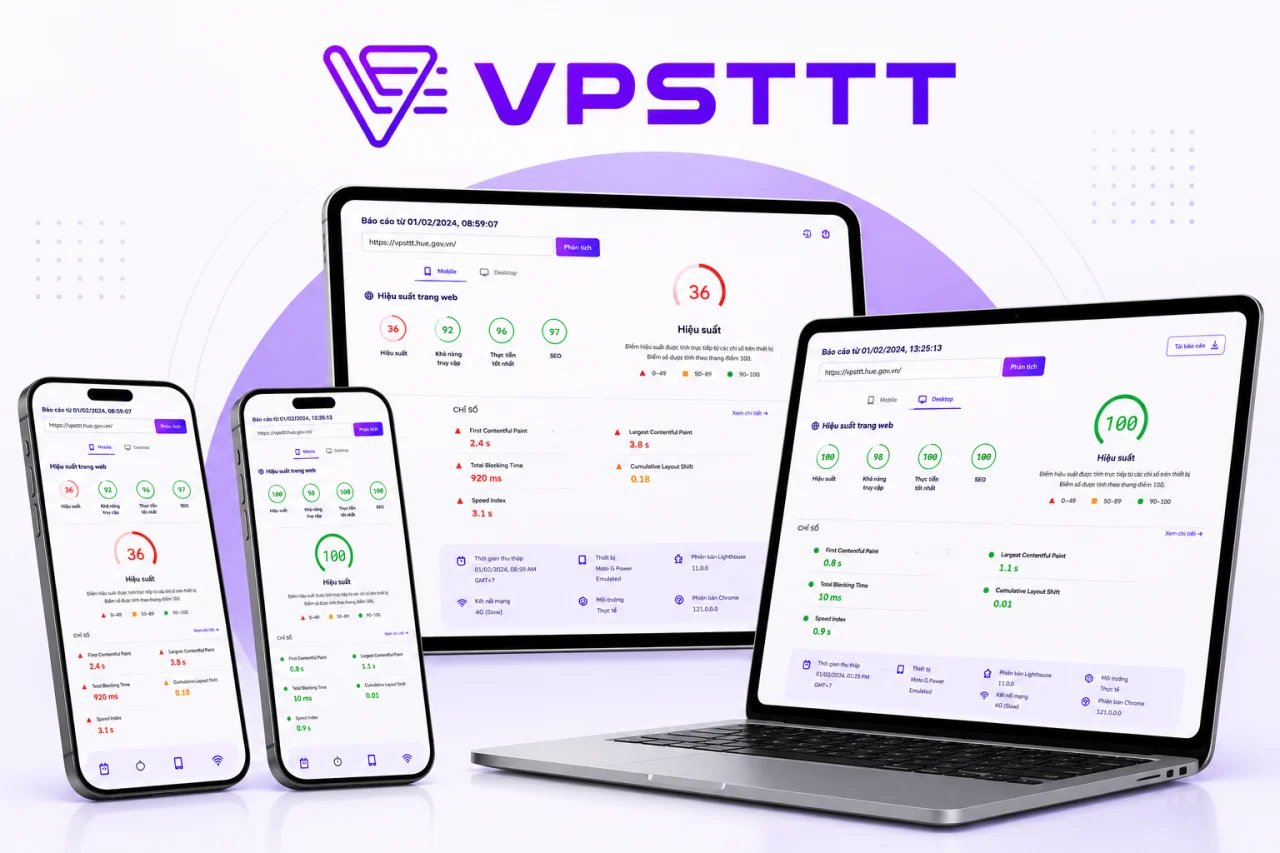
VPTS.COM Performance 36 → 100
VPTS.COM achieves 100 points on NVMe VPS infrastructure
VPTS's website previously scored a 36 performance score. After moving to a suitable NVMe VPS configuration and optimizing cache, images, and CSS/JavaScript, the performance score reached 100; SEO and Best Practices also reached 100. A faster, more stable foundation helps service content get crawled, understood, and distributed more effectively across search engines and AI systems.
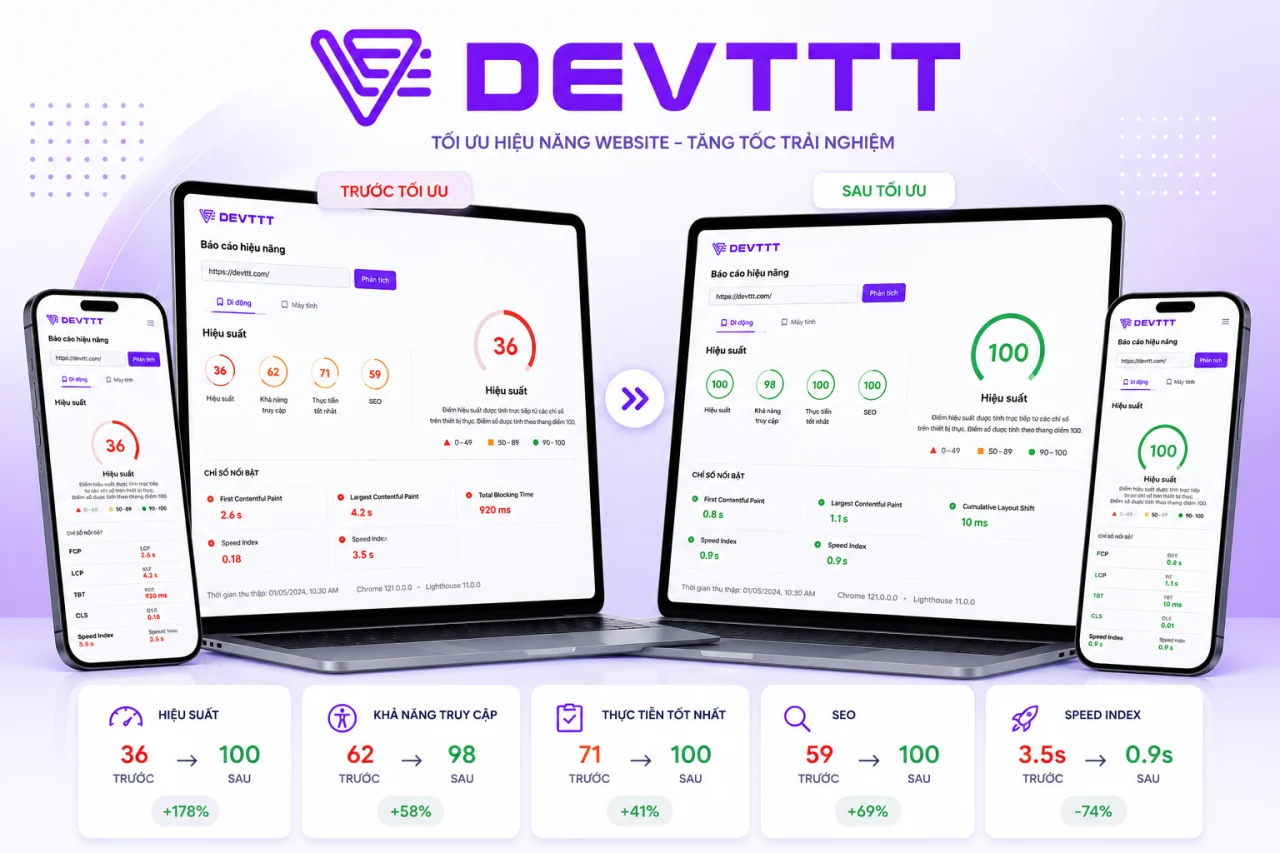
DEVTTT Performance 36 → 100
DEVTTT leaps from 36 to 100 with VPTS VPS
Before using VPTS VPS, the DEVTTT website scored only 36 in performance, affecting the speed of viewing company portfolios and web design services. After migrating infrastructure and optimizing resources, performance reached 100; accessibility, Best Practices, and SEO improved consistently, creating a better foundation for Google and AI tools to discover and evaluate content.
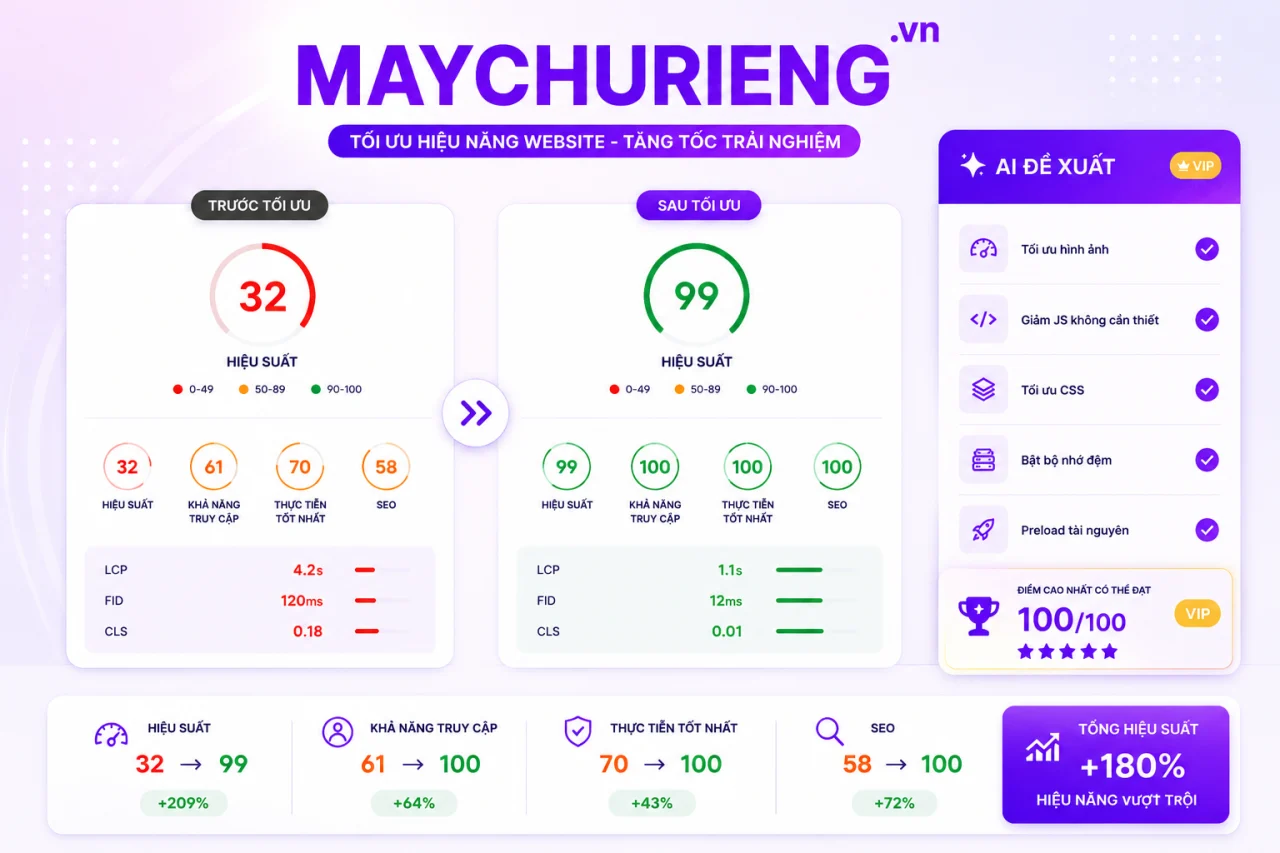
MAYCHURIENG.VN Performance 32 → 99
MAYCHURIENG.VN increased from 32 to 99 after migrating VPS
MAYCHURIENG.VN previously scored only 32 performance points on its old infrastructure. After moving to VPTS VPS and optimizing images, CSS/JavaScript, caching, and priority resources, the score increased to 99; Accessibility, Best Practices, and SEO reached 100. The website responds faster, helping server content become more discoverable and better understood by search engines and AI.
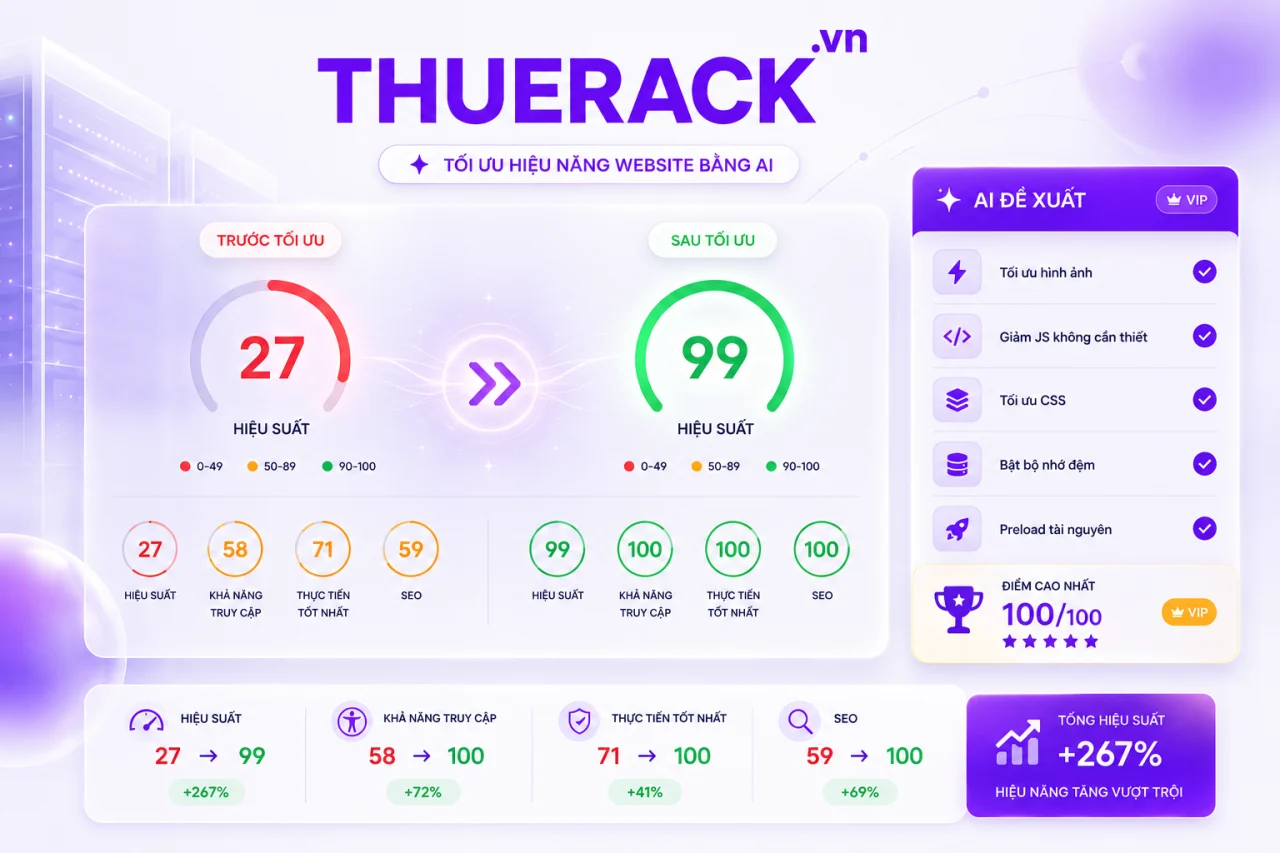
THUERACK.VN Performance 27 → 99
THUERACK.VN increased from 27 to 99 thanks to VPTS VPS infrastructure
Before migrating infrastructure, THUERACK.VN scored only 27 in performance, causing service pages to load slowly and making customer retention difficult. When running on VPTS VPS, combined with image, source code, and cache optimization, performance jumped to 99; the other three metric groups reached 100. Better speed and structure help the website be crawled and evaluated more favorably by Google and AI systems.
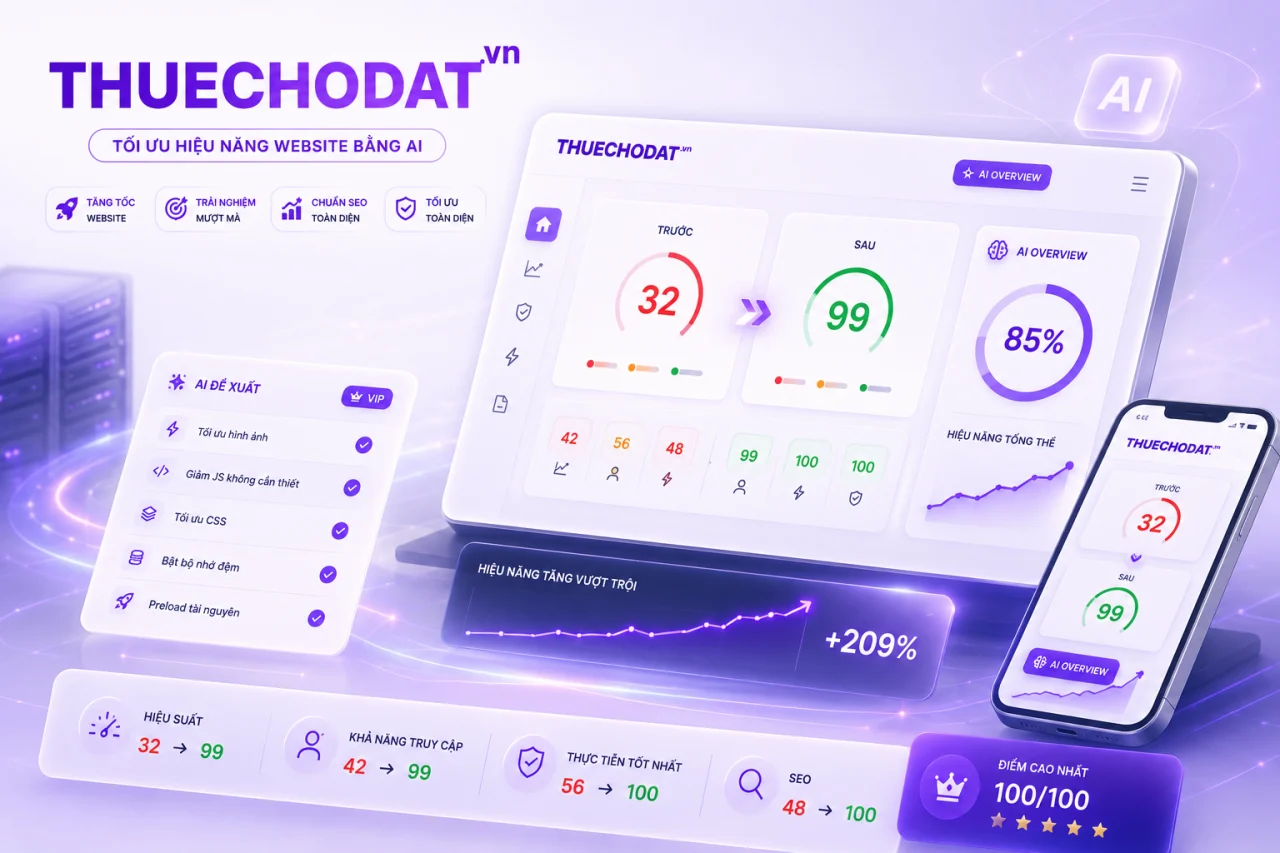
THUECHODAT.VN Performance 32 → 99
THUECHODAT.VN increased from 32 to 99 after migrating to VPTS VPS
THUECHODAT.VN previously scored 32 in performance before migrating to VPTS VPS. After upgrading infrastructure and optimizing display resources across multiple devices, performance score jumped to 99, accessibility reached 99, and Best Practices and SEO reached 100. The website is faster and clearer, creating a foundation for service content to rank better on traditional search and AI search.

ASENRA.VN Performance 31 → 99
ASENRA.VN from 31 to 99, better prepared for AI search
ASENRA.VN is a website showcasing architectural and interior design and construction services. Before migrating to VPTS VPS, the site achieved a performance score of only 31; after upgrading infrastructure and optimizing images, JavaScript, CSS, and internal links, the score increased to 99. The website loads quickly, remains stable, and has a clearer structure, enabling Google, AI Overview, and AI search systems to crawl, understand content, and recommend it more easily to customers interested in living spaces.
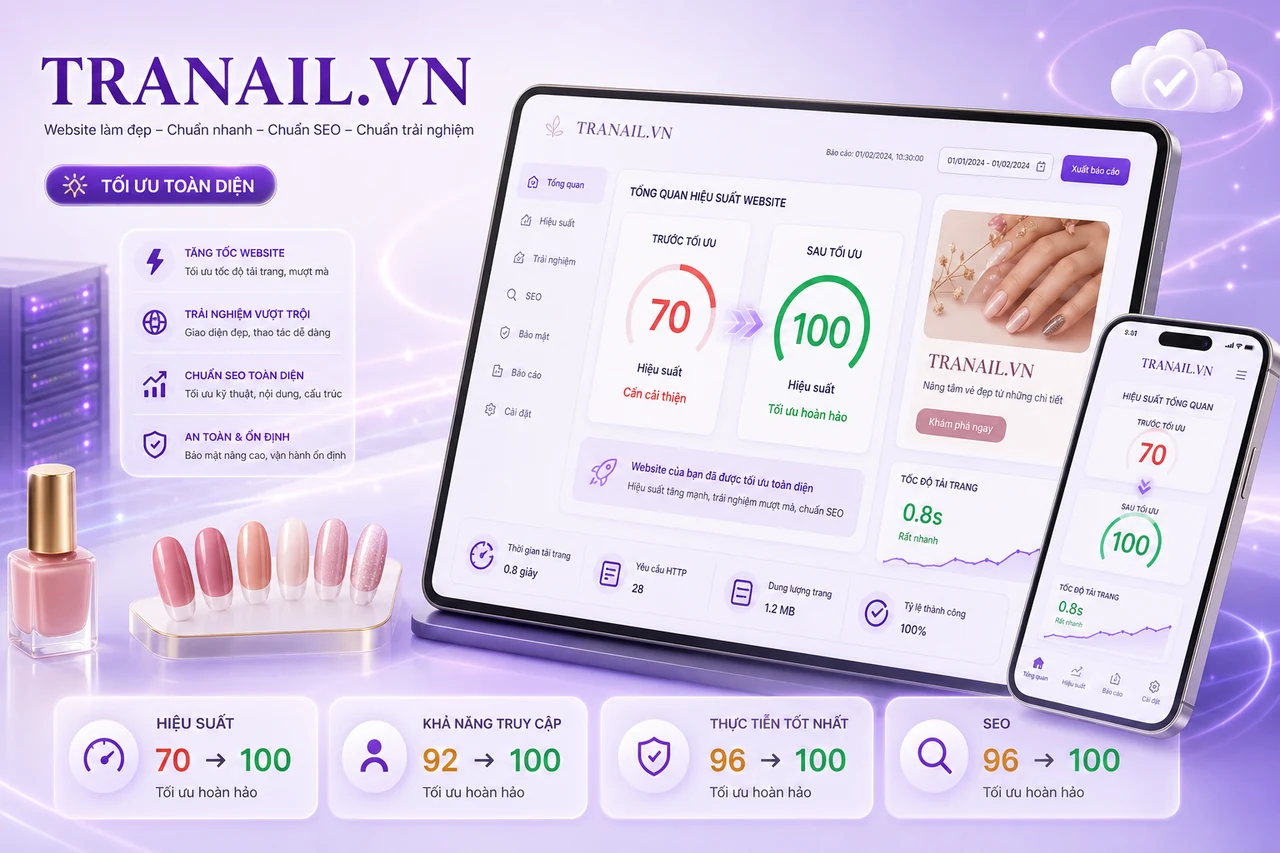
TRANAIL.VN All metrics 70 → 100
TRANAIL.VN increased from 70 to 100, all metrics reached 100
After migrating to VPTS VPS infrastructure and optimizing page load resources, TRANAIL.VN increased its performance score from 70 to 100; Accessibility, Best Practices, and SEO also all reached 100. The nail salon website loads quickly, runs stably, and features a clearer structure on both mobile devices and desktop computers.
CentOS VPS helps technical teams get started with the right OS while maintaining the freedom to choose hardware based on workload.
Complete pricing tables and clear order parameters make comparison, ordering, and scaling more transparent.
Mua ngayHigh performance, cost-effective
Choose CentOS if your project requires a familiar Linux environment with the RHEL ecosystem and long-standing enterprise software.
Choose Intel Platinum for balanced needs, AMD EPYC for parallel processing, Ryzen 9 for high clock speeds, or Intel Gold for low response latency.
Contact VPTS if you need a configuration review based on traffic, database, user count, software, and growth plans prior to ordering.
View pricing


